
No Black Boxes!
by
Craig S. Mullins
Before I even begin here I better define what I mean by a
“black box.” If I plan to recommend that you prohibit them we better both
understand what it is we are talking about proscribing.
Simply put, a black box is a database access program that
sits in between your application programs and DB2. It is designed so that all
application programs call the black box for data instead of writing SQL
statements that are embedded into a program. The general idea behind such a
contraption is that it will simplify DB2 development because programmers will
not need to know how to write SQL. Instead, the programmer just calls the black
box program to request whatever data is required. SQL statements become calls –
and every programmer knows how to code a call, right?
This approach is commonly referred to as a “black box”
approach because the data access interface shields the developers from the
“complexities” of SQL. The SQL is contained in that black box and programmers do
not need to know how the SQL works – just how to call the black box for data.
Black boxes usually are introduced into an organization when management gets the
notion that it would be quicker and easier for programmers to request data from
a central routine than to teach them all SQL.
But there are a number of reasons why this approach is not
sound. Let’s examine them.
Ignorance (of SQL) is not a Virtue
The basic premise of implementing black box technology is
that it is better for programmers to be ignorant of SQL. This means that your
company will be creating DB2 applications using developers with little to no
understanding of how SQL works. So what may seem like simple requests to a
non-educated programmer may actually involve very complex and inefficient SQL
“behind the scenes” running in the black box. So innocuous requests for data can
perform quite poorly.
When programmers are knowledgeable about SQL they can at
least understand the complexity of their data requests and formulate them to
perform better. For example, SQL programmers will understand when data must be
joined and thereby can form their data requests in such a way as to join
efficiently (and perhaps to minimize joining in certain circumstances). With no
knowledge of SQL the programmer will have no knowledge of joining – and more
importantly, no true means at his or her disposal to optimize their data
requests.
As much as 80 percent of all
database performance problems can be traced back to inefficient application
code. Basic SQL is simple to learn and easy to start using. But SQL tuning and
optimization is an art that can take years to master.
Be sure to train your
application development staff in the proper usage of SQL – and let them write
the SQL requests in their programs. Develop and publish SQL guidelines in a
readily accessible place (such as your corporate intranet or portal). These
guidelines should outline the basics elements of style for DB2 SQL programming.
For example, at a very high level, the following rules of thumb need to be
understood by your development staff:
- Simpler may be better for rapid
understanding, but complex SQL is usually more efficient – SQL joins
outperform program joins, SQL WHERE clauses outperform program filtering,
and so.
- Let SQL do the work, not the
program – the more work that can be done by DB2 in its database engine the
better your applications will perform.
- Retrieve the absolute minimum
number of rows required; never more – it is better to eliminate rows in SQL
WHERE clauses than it is to bring the data into the program and bypass it
there. The less data that DB2 needs to read and send to your program the
better your applications will perform.
- Retrieve only those columns
required; never more – additional work is required by DB2 to send additional
columns to your programs. Minimizing the number of columns in your SELECT
statements will improve application performance.
- When joining tables, always
provide join predicates. In other words, avoid Cartesian products.
- Favor Stage 1 predicates –
another name for Stage 1 predicates is sargable predicates. A Stage 1
predicate is evaluated earlier in the process than a Stage 2 predicate, and
therefore causes less data to be sent along for further processing by DB2.
Stage 1 predicates tend to change with each new version of DB2 so make sure
you know which version of DB2 you are using, which predicates are Stage 1,
and which predicates are Stage 2. Refer to Figure 1 for a detailed depiction
of Stage 1 versus Stage 2 processing.
- Favor Indexable predicates – when
a predicate is indexable then DB2 can use an index to satisfy that
predicate. Not so, for a non-indexable predicate. Therefore, indexable
predicates give DB2 more leeway for using indexes – which usually results in
better performance.
- Avoid table space scans for large
tables
- Avoid sorting if possible by
creating indexes for ORDER BY and GROUP BY operations.
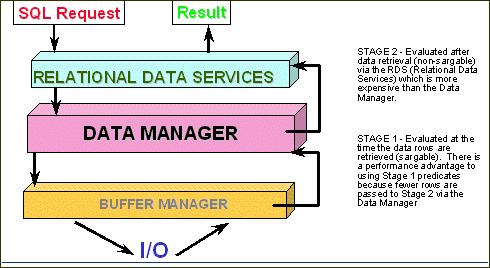
Figure 1. Stage 1 versus Stage 2 Processing
And, let’s face it, even when using a black box some
technicians in your organization still have to understand SQL – namely the
writer(s) of the black box code. Because all of the SQL is coded in the black
box program (or programs) someone has to be capable of writing efficient and
effective SQL inside of the black box program. Which brings us to our next
consideration.
Shortcuts Make for Poor Performance
The SQL programmers in charge of writing the black box code
will inevitably introduce problems into the mix. This is so because of simple
human nature – and because of most technicians’ desire to find shortcuts. But
SQL shortcuts can lead to poor performance.
The black box inevitably will deviate from the standards
and procedure of good SQL development. For example, let’s assume that there are
three application programs and each one of them needs to retrieve customer
information by area code. Program 1 needs the customer name and address, program
2 requires customer ID, name, and phone number, and program 3 requires customer
ID, name and type. This is properly coded as three different SQL requests (each
one in its own program). For program 1 we would write:
SELECT FIRST_NAME, LAST_NAME, ADDRESS,
CITY,
STATE, ZIP
FROM CUSTOMER_TAB
WHERE AREA_CODE = :HV-AC;
For program 2 we
would write:
SELECT CUST_ID, FIRST_NAME, LAST_NAME,
PHONE_NUM
FROM CUSTOMER_TAB
WHERE AREA_CODE = :HV-AC;
And for program 3 we would write:
SELECT CUST_ID, FIRST_NAME, LAST_NAME,
CUST_TYPE
FROM CUSTOMER_TAB
WHERE AREA_CODE = :HV-AC;
Of course, all of these SQL statements are remarkably
similar, aren’t they? If we were in charge of writing the black box for these
requests we would likely consolidate these three SQL statements into one
statement like this:
SELECT FIRST_NAME, LAST_NAME, ADDRESS,
CITY,
STATE, ZIP, PHONE_NUM, CUST_TYPE
FROM CUSTOMER_TAB
WHERE AREA_CODE = :HV-AC;
Then our query will work for all three of these requests.
When program 1 calls the black box we execute the query and return just the
customer name and address; for program 2 we return just customer ID, name, and
phone number; and for program 3 the black box returns only customer ID, name and
type. We’ve coded a shortcut in our black box.
“So what?” you may ask. Well, this is bad program design
because we are violating one of our SQL coding guidelines. Remember, SQL
statements should retrieve only those columns
required; never more. This is so because additional work is required by DB2 to
send additional columns to your programs. Minimizing the number of columns in
your SELECT statements will improve application performance.
By coding shortcuts such as
these into the black box you are designing poor performance into your DB2
applications. And a black box will use shortcuts. The example given here
is a simple one, but even more complex shortcuts are possible in which WHERE
clauses are coded so that they can be bypassed with proper host variables. For
example, perhaps sometimes we need to query by area code and other time by area
code and customer type. Well, we could code the CUST_TYPE predicate as a range
something like this:
WHERE CUST_TYPE >= :HV1 and
CUST_TYPE =< :HV2;
When we want to query for
CUST_TYPE we simply provide the same value to both HV1 and HV2; when we do not
want to query for CUST_TYPE we choose a larger value for HV1 than for HV2 (for
example, 1 and 0). This effectively blocks out the CUST_TYPE predicate. Using
tricks like this it is possible to cram a lot of different SQL statements into
one – with the results usually being worse performance than if they were
separate SQL statements.
Extra Code Means Extra Work
Additionally, when you code a black box your application
will require more lines of code to be executed than without the black box. It is
elementary when you think about it. The call statement in the calling program is
extra and the code surrounding the statements in the black box that ties them
together is extra. None of this is required if you just plug your SQL statements
right into your application programs.
This extra code must be compiled and executed. When extra
code is required – no matter how little or efficient it may be – extra CPU will
be expended to run the application. More code means more work. And that means
degraded performance.
SQL is Already an Access Method
The final argument I will present here is a bit of a
philosophical one. When you code a black box you are basically creating a data
access method for your programs. To access data each program must call the black
box. But SQL is already an access method – so why create another one?
Not only is SQL an access method but it is a very flexible
and comprehensive access method at that. You will not be able to create an
access method in your black box that is as elegant as SQL – so why try?
Summary
Do not implement data access interfaces that are called by
application programs instead of coding SQL requests as needed in each program.
When a black box is used, the tendency is that short cuts are taken. The black
box inevitably deviates from proper SQL development guidelines, requires
additional work and additional code, and is just another access method that is
not required. Do not get lost in the black box – instead, train your programmers
to code efficient SQL statements right in their application programs. Your
applications will thank you for it!
From DB2 Update (Xephon) July 2003.
© 2003 Craig S. Mullins, All rights reserved.
Home.

|  Craig S. Mullins